



Introduction: Why Cloud Security Is No Longer Optional
Let’s be honest — most of us love the cloud. It’s convenient, flexible, and honestly, kind of magical. You upload a file from your laptop, and seconds later it’s accessible from your phone halfway across the world. But here’s the uncomfortable truth: the same convenience that makes cloud computing amazing also makes it a prime target for cyber threats.
We’ve all been there. You sign up for a new app, store sensitive information, and just assume it’s safe because, well, it’s “in the cloud.” But what does that really mean? Behind that simple phrase lies a complex infrastructure managed by providers like Amazon Web Services, Microsoft Azure, and Google Cloud. And while these giants invest heavily in security, your data’s protection also depends on you.
So today, we’re diving deep into practical, real-world cloud security tips that actually make a difference. Not technical jargon overload. Not fear-mongering. Just actionable advice you can apply right away.
Let’s get into it.
Understanding the Shared Responsibility Model
Before we jump into cloud security tips, you need to understand something critical: cloud security is a shared responsibility.
What Does That Mean?
Think of it like renting an apartment. The landlord provides the building structure, locks, and maybe security cameras. But you’re responsible for locking your door and not giving your keys to strangers.
Cloud providers secure the infrastructure — servers, networking, physical data centers. But you? You’re responsible for:
- Managing user access
- Protecting your data
- Configuring settings properly
- Monitoring activity
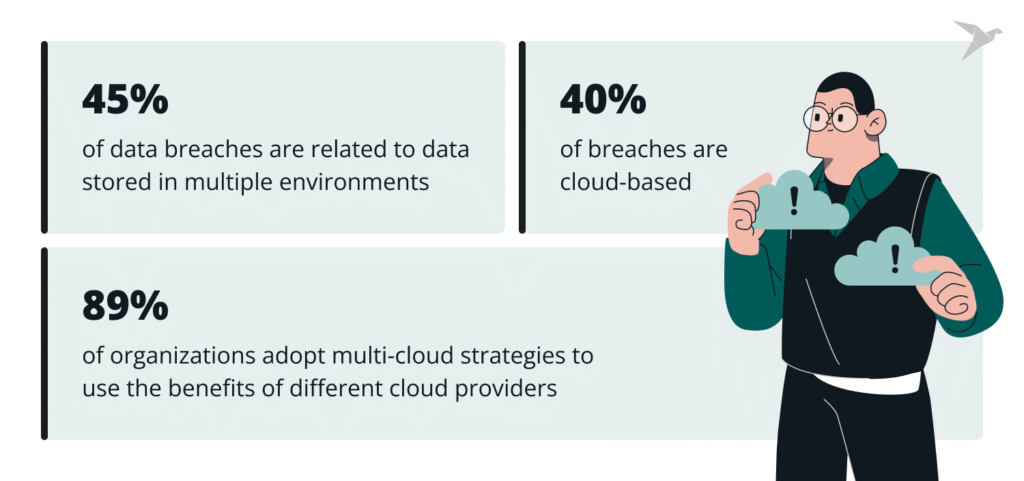
And trust me, misconfiguration is one of the biggest reasons companies face data breaches. Not hacking genius. Not sci-fi attacks. Just simple configuration mistakes.
So, if you remember only one thing from this article, let it be this: Cloud security starts with you.
Essential Cloud Security Tips You Shouldn’t Ignore
Now let’s walk through practical, easy-to-apply cloud security tips that strengthen your defenses without making your life miserable.
1. Use Strong Identity and Access Management (IAM)
If you only implement one cloud security tip, make it this.
Why IAM Matters
Imagine giving every employee in your company full admin access. Sounds risky, right? Yet many organizations accidentally do something similar in the cloud.
Follow the Principle of Least Privilege (PoLP):
- Give users only the access they absolutely need
- Remove unused accounts immediately
- Regularly review permissions
And please, don’t share admin credentials via email. We’ve all seen that happen. It never ends well.
Multi-Factor Authentication (MFA) Is Non-Negotiable
Passwords alone aren’t enough anymore. Add an extra layer:
- SMS verification
- Authenticator apps
- Hardware security keys
So even if a password is stolen, your system stays protected.
2. Encrypt Everything — At Rest and In Transit
Here’s a simple rule: if it’s not encrypted, it’s exposed.
Data at Rest
This refers to stored data. Ensure encryption is enabled on:
- Databases
- File storage
- Backups
Most cloud providers offer built-in encryption tools. Use them.
Data in Transit
This is data moving between systems. Always:
- Use HTTPS
- Enable TLS protocols
- Avoid unsecured public networks
And yes, that includes accessing sensitive dashboards over café Wi-Fi. We’ve all done it. But it’s risky.
3. Regularly Update and Patch Systems
You know those annoying update notifications? They’re there for a reason.
Cybercriminals often exploit known vulnerabilities. If you delay patching:
- You’re leaving doors unlocked
- You’re inviting trouble
Enable automatic updates where possible. Especially for:
- Operating systems
- Web applications
- Cloud-based tools
And don’t forget third-party integrations. They’re often the weakest link.
4. Monitor and Log Everything
One of the smartest cloud security tips? Visibility.
You can’t protect what you can’t see.
Enable Logging and Alerts
- Track login attempts
- Monitor unusual IP activity
- Set alerts for privilege changes
Security isn’t just prevention — it’s detection. The faster you detect a threat, the faster you respond.
And here’s something interesting: many breaches go unnoticed for months. Not because they’re invisible — but because nobody was looking.
5. Secure Your APIs
APIs are powerful. They allow services to communicate seamlessly. But they can also be entry points for attackers.
To protect them:
- Use authentication tokens
- Implement rate limiting
- Avoid exposing sensitive endpoints
- Regularly test API security
And honestly, don’t assume default settings are secure. They rarely are.
6. Backup Your Data (And Test It)
Cloud storage feels reliable — and it is. But accidents happen.
Why Backups Matter
- Ransomware attacks
- Accidental deletion
- System failures
Backups give you peace of mind.
But here’s the part most people skip: test your backups.
There’s nothing worse than discovering your backup doesn’t work during a crisis.
7. Segment Your Network
Think of network segmentation as dividing your house into locked rooms instead of one giant open space.
If an attacker gains access:
- They can’t roam freely
- Damage is limited
- Sensitive systems stay isolated
Use:
- Virtual private clouds (VPCs)
- Firewalls
- Subnet restrictions
It’s about containing threats before they spread.
8. Educate Your Team (Yes, Humans Are the Weakest Link)
Technology is powerful. But human error causes many breaches.
Train Employees On:
- Phishing detection
- Safe password practices
- Recognizing suspicious activity
- Secure file sharing
And make training ongoing — not just a one-time presentation everyone forgets.
Trust me, a well-informed employee is your strongest security asset.
9. Use Zero Trust Architecture
Here’s a mindset shift: Trust nothing. Verify everything.
Zero Trust means:
- Every access request is verified
- Devices are checked
- Location and behavior are analyzed
Even internal users must authenticate continuously.
It might sound strict. But in today’s digital landscape, it’s smart.
10. Conduct Regular Security Audits
You can’t just set up security and forget about it.
Schedule:
- Penetration testing
- Vulnerability scans
- Configuration reviews
And consider third-party audits for unbiased evaluation.
Security evolves. So should your defenses.
Comparing Cloud Security vs. On-Premise Security
You might wonder — is cloud security tips really better?
Cloud Security Advantages
- Advanced infrastructure
- 24/7 monitoring by experts
- Built-in redundancy
- Automatic scaling
On-Premise Advantages
- Full control
- Direct physical access
- Custom security design
But here’s the reality: most small and medium businesses are actually more secure in the cloud — if they follow proper cloud security tips.
It’s not about location. It’s about configuration and awareness.
Common Cloud Security Mistakes to Avoid
Let’s quickly talk about what not to do:
- Using weak passwords
- Ignoring activity logs
- Granting excessive permissions
- Skipping encryption
- Assuming “the provider handles everything”
That last one? It’s the most dangerous myth of all.
Emerging Trends in Cloud Security
Technology never stands still. And neither do threats.
Here are some trends shaping the future:
- AI-powered threat detection
- Cloud-native security platforms
- Automated compliance checks
- Secure access service edge (SASE)
And honestly, automation is becoming essential. Manual security management just doesn’t scale anymore.
Conclusion: Secure the Cloud Before It’s Too Late
Cloud computing isn’t going anywhere. In fact, it’s becoming the backbone of modern business.
But convenience without security? That’s a recipe for disaster.
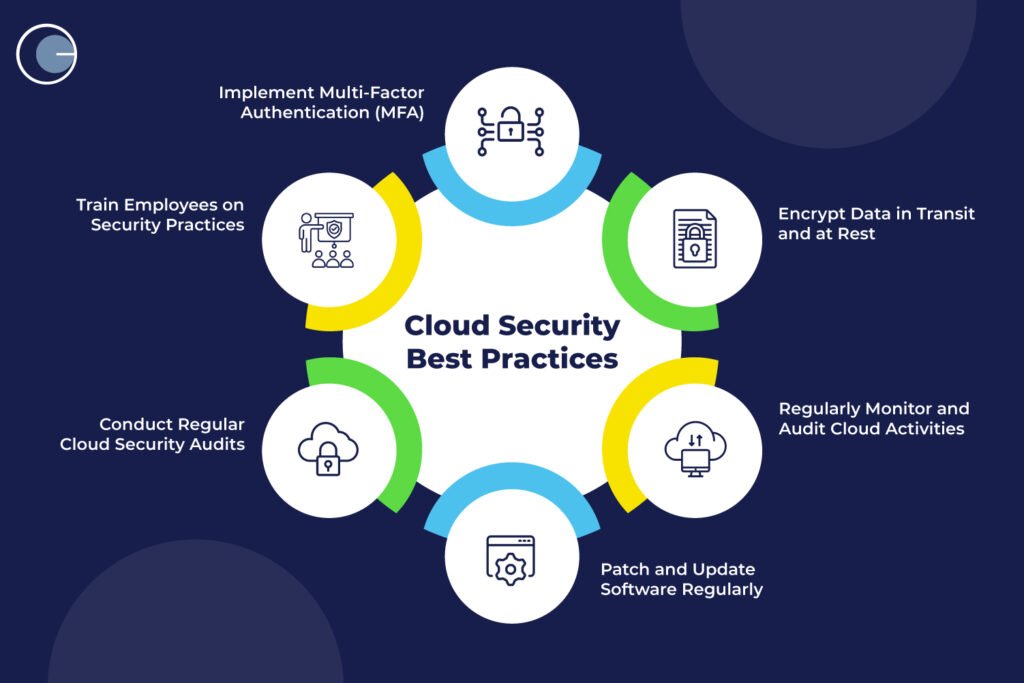
By implementing these practical cloud security tips — strong access controls, encryption, monitoring, backups, and employee training — you dramatically reduce your risk.
And here’s the empowering part: you don’t need to be a cybersecurity expert to get started. Small, consistent improvements make a huge difference.
So take one step today. Review your access settings. Enable MFA. Schedule a security audit.
Because when it comes to cloud security, prevention isn’t just cheaper than recovery — it’s smarter.
FAQs About Cloud Security Tips
1. What are the most important cloud security tips for beginners?
Start with strong passwords, enable multi-factor authentication, encrypt your data, and limit user access. These basics provide powerful protection.
2. Is cloud storage safer than local storage?
It can be — especially when managed by reputable providers. However, security depends on proper configuration and user practices.
3. How often should I perform a cloud security audit?
At least once or twice a year. Larger organizations may require quarterly reviews.
4. Can small businesses benefit from cloud security practices?
Absolutely. In fact, small businesses are often targeted by attackers. Following essential cloud security tips helps prevent costly breaches.
Cloud security isn’t about paranoia. It’s about preparation. And now that you know what to do, you’re already one step ahead.
